train
Before we can begin training a model, there is are plenty of choices to be made. So, before you continue, take some time to go over the following settings.
The names of these topics correspond to the section where the respective settings should go to in your config TOML file.
files
Once you have made your choices, you can also specify under which names your
model files should be saved. These entries should be appended to the [files]
section of your config TOML file, but you can also specify them on the command
line as --files.<KEY> <VALUE>.
- files.checkpoint = “checkpoint.pt”
Starting from a clean slate, this file contains all the information that is needed to restart model training exactly where you left off in case you had to interrupt it for some reason. It is updated at the end of each epoch, but only if the loss on the test data set is lower than in the epoch before. That way, you always have the best state so far.
- files.weights = “weights.pt”
This file contains the final model’s
state_dictto flexibly restore the trained model later (or parts of it).- files.model = “model.pt”
Contains a compressed pickle of the entire trained model for easier, but less flexible loading later.
After all of this, your config TOM file might look something like:
work_dir = "/absolute/path/to/your/working/directory"
log_level = 10
progress = true

[files]
raw = "/absolute/path/to/data/files"
suffix = "pqt"
column = "document"
min_doc_len = 32
cleaners = ["quotes", "encoding"]
encoding = "cp1252"
tokenizer = "tokenizer.json"
checkpoint = "check.pt"
weights = "state.pt"
model = "final.pt"

[tokens]
algo = "bpe"
vocab = 30000
eos_string = "\n\n"
eos_regex = "\n{2,}"

[data]
...

[model]
...

[model.feedforward]
...

[train]
...
Important
The files just discussed will be created in a subfolder of your work_dir
to maintain some order and overview over all your training runs as you
experiment with different model sizes, architectures and training parameters.
By default, this subfolder will be set to a hash of your settings, but
it is strongly encouraged to explicitly provide a --name on the command line.
slangmod train --name my-first-experiment
commands
- train
Start training the specified model with given parameters. As training progresses, the subfolder whose
--nameyou just specified will be populated with three folders that contain files with the start time of your training run as names.logs Mirroring what you see in the console (with log_level = 10).
summary A copy of your entire config and, once training finishes, the training history and validation results. Because these file are also in TOML format, you could simply copy and paste them to re-run with the exact same setting.
convergence CSV files with (training loss, learning rate) pairs written every cb_freq = 1 times to monitor convergence.
- monitor
While training is running, you can open another terminal and invoke:
slangmod monitor --name my-first-experiment
This will print a GnuPlot file that you can directly pipe to the
gnuplotcommand (if you have it installed, which I recommend).slangmod monitor --name my-first-experiment | gnuplot
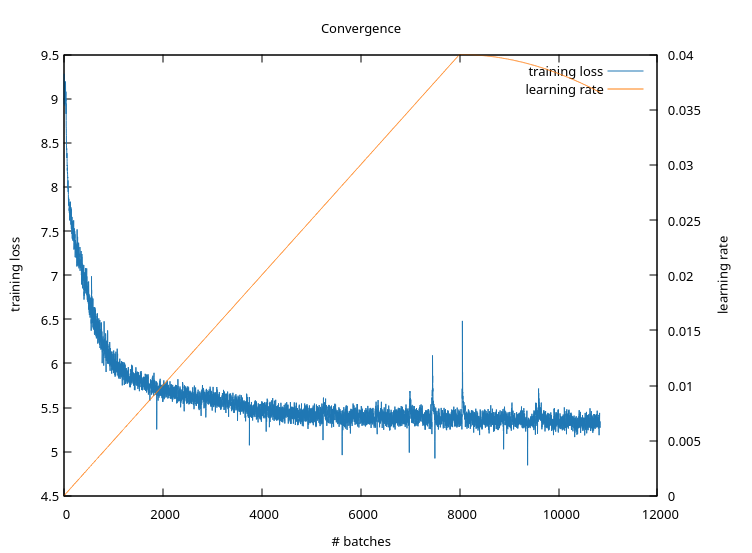
The pop-up window with the plot will refresh every second, giving you a real-time view on training progress. The loss should only ever go down. If it jumps up, then the
learning_rateis too large at that point. Try to lower it or try to increasewarmup.- compare
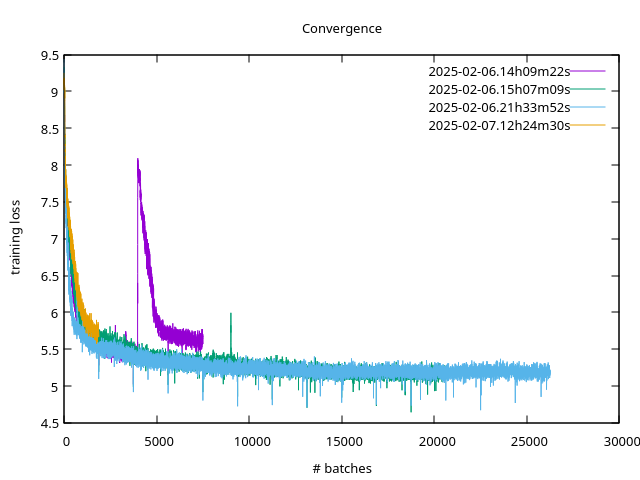
As you experiment with different training loop parameters to accelerate convergence, you might want to compare all the training runs you conducted under a specific name. To do so, invoke:
slangmod compare --name my-first-experiment
This will print a different GnuPlot file, plotting the training loss curves for all runs it can find under the given name.
Important
You need to persist the plotting window when piping into
gnuplotas it only shows you a single snapshot and will not refresh.slangmod compare --name my-first-experiment | gnuplot -p
- summarize
To keep track of all the different settings you have experimented with under one and the same name, you can invoke
slangmod summarize --name my-first-experiment
which will pretty-print a list of all files in the summary subfolder in JSON format. Pipe it to jq to parse it for whatever you are interested in, for example:
slangmod summarize --name my-first-experiment | jq '.[] | .start, .train.learning_rate, .validation.loss'